1xBet deposit not working — two Success screens, only one is the bookmaker
The bank or wallet said Success. The 1xBet balance did not move. Those are two systems. Save the payment ID first. Do not send the same amount again. Pay only the merchant on your own logged-in Deposit screen.
Code VIP4YOU — the code we publish, free at registration
Direct answer
A green wallet SMS is not a 1xBet credit
PhonePe, M-Pesa, Pix or your bank can debit you before 1xBet matches the merchant reference to your account. Wait the normal window for that rail. Then open support with the external TX ID (UTR, TrxID, E2E, txid). A second deposit creates two tickets. If the main balance did rise and the welcome is missing, that is a registration-code problem, not this page. Promo VIP4YOU is registration-only.
Live operator capture
Pay only the merchant this screen shows
A green Success in PhonePe or your bank only proves the payment method moved money. 1xBet still has to match that payment to your deposit session. This is the India deposit list — UPI Fast and UPI on top, 70 methods in the dropdown. Kenya, Bangladesh or Pakistan show different methods after login — never reuse a Paybill or QR from a Telegram list.
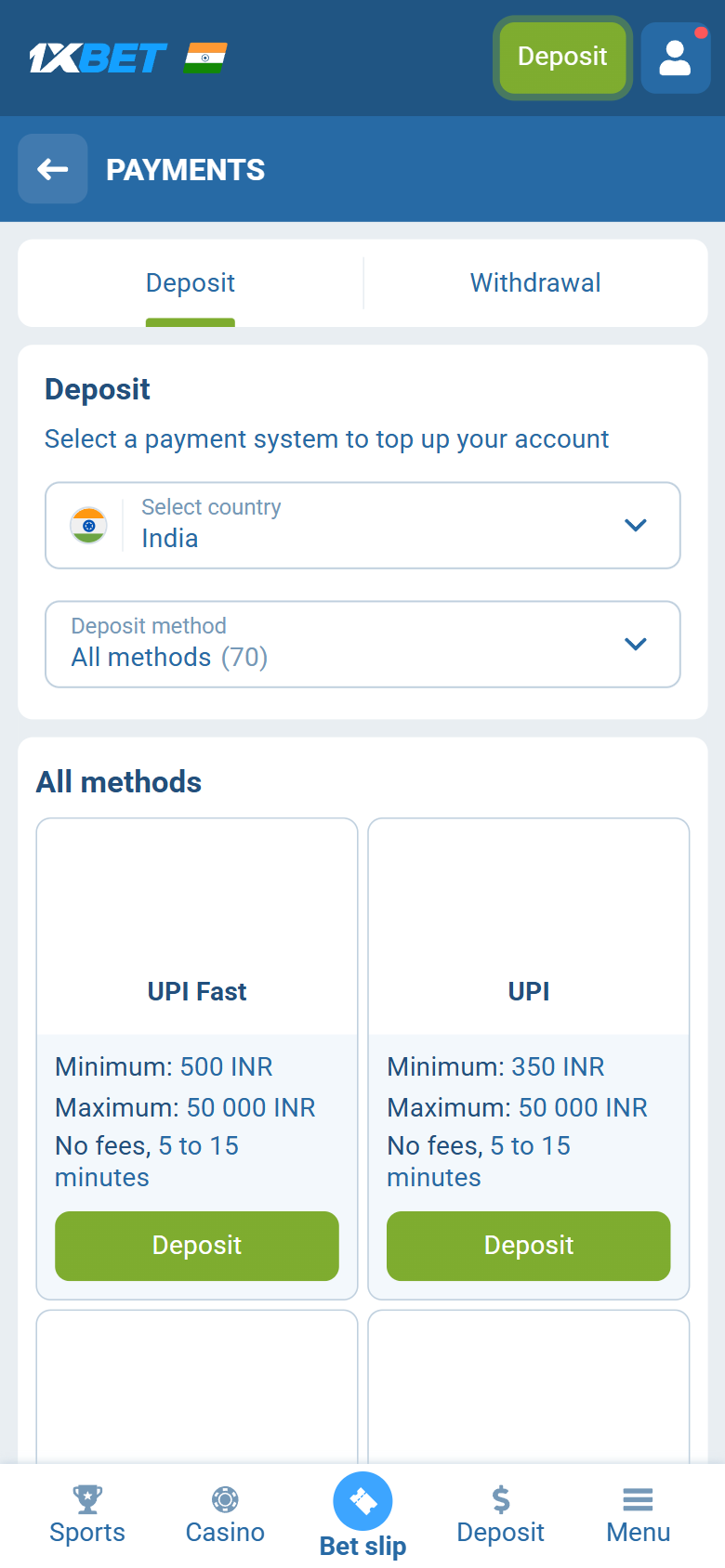
Read Deposit history first
Guessing from the payment-app SMS alone causes double deposits. Open the deposit history section of the account (uncaptured; the label may differ), then use this map. Rail speed norms sit on each method page and on minimum deposit.
| What you see | Meaning | What you do |
|---|---|---|
| Nothing in the deposit history section | 1xBet never received a matchable payment for this account | Suspect wrong merchant / expired QR / phishing Paybill. Ticket with rail Ref only if the wallet was debited |
| Pending / processing | Bookmaker or rail still matching the payment | Wait the normal window for that method; do not re-pay the same amount |
| Failed / cancelled / rejected | The deposit screen or your bank refused the top-up | Check bank refund; fix amount/min, 3-D Secure, gambling block, then one clean retry |
| Completed + balance up | Deposit worked | If welcome offer missing → bonus checklist, not this page |
| Wallet Success + history empty | Classic unmatched reference | Support with UTR/TrxID/E2E/txid + screenshots; one ticket, zero second deposits |
Universal checklist (any method)
These steps apply whether you use UPI, M-Pesa, bKash, JazzCash, Pix, cards or crypto. Rail-specific traps are in the next section. Work top to bottom — skipping “merchant source” is how people lose money permanently.
1. Separate “payment app success” from “1xBet balance”
A green Success screen in PhonePe, M-Pesa, Pix or your bank only proves the rail moved money. 1xBet still has to match the payment to your account ID / merchant reference. Until that match happens, the sportsbook balance can stay flat even though your wallet was debited. Those are two different systems with two different IDs.
What to do: Write down: (1) external Ref / UTR / TrxID / E2E / txid, (2) exact amount and currency, (3) time + timezone if you know it, (4) whether the 1xBet deposit history shows pending, failed, or nothing. Do not send a second deposit until you know which side failed.
2. What does the deposit history inside 1xBet show?
The labels here are ours — we have not captured that screen, so its own wording may differ. Empty history + debited wallet = unmatched reference or wrong merchant. “Pending” on 1xBet = wait the rail window. “Failed / cancelled” = the bookmaker never took the money (or reversed it) — check whether your bank refunded. “Completed” with balance up is not a deposit failure.
What to do: Open the deposit history section of the account (uncaptured; the label may differ). Screenshot both 1xBet and the payment app before contacting support. Map the label to the status table above.
3. Did you pay the merchant / Paybill / QR from your own deposit screen?
Public “Paybill lists”, Telegram agents, recycled QR codes and “helper” WhatsApp numbers are how funds leave a wallet and never reach a bookmaker account: the payee was never the operator. Merchant IDs rotate; only the code inside your logged-in deposit screen is valid for that session.
What to do: Always: Deposit → choose method → copy ID / scan QR shown there. Never reuse a number from a blog comment, YouTube description or WhatsApp “agent”. If you already paid a third-party merchant, treat recovery as support + bank dispute territory — not another blind top-up.
4. Amount vs minimum, daily caps and decimal typos
Under-minimum amounts, daily UPI/M-Pesa/bKash ceilings, bank single-transaction caps, and wrong decimal separators (1.000 vs 1,000) produce “I paid” stories that the deposit screen never accepted as a valid top-up. Partial debits and reverse-SMS on the same day also confuse people into thinking the site is down.
What to do: Compare the debit line on the SMS/receipt to the amount you intended. Floors: minimum deposit. Method pages under payment methods.
5. Is the bank/wallet blocking gambling merchants?
An issuer can decline a “gambling / restricted merchant” payment on a card or a bank-branded UPI app while another app on the same bank goes through. That is an issuer filter, not a broken 1xBet site. Repeated declines can soft-lock the card or trip fraud rules on your side.
What to do: Retry with another app on the same rail, a smaller test amount once, or a different method (crypto / mobile money). Do not hammer the same declined card five times — repeated declines can freeze the card.
6. Did the QR / Pix / session expire mid-payment?
Leaving the deposit screen open while you hunt for an app, switch Wi-Fi, or enter a PIN can invalidate the QR, Copia e Cola string or USSD session. Paying an expired code can debit a dead session that never matches your account.
What to do: Generate a fresh code, complete payment within the countdown, stay on the same network if possible, then wait the normal credit window before retrying.
7. Are you looking at the same account you paid for?
Quick-sign-up IDs, multiple phone numbers, and “I registered again after login failed” create deposits that land on an account the user is not currently viewing. Mirror-site bookmarks can also show a different product skin without the same wallet history.
What to do: Confirm account ID in the profile header matches the ID you used when opening Deposit. Login help: how to login. If you opened a second account by mistake, do not keep depositing into both.
8. Deposit landed — but you expected the welcome boost
If main balance increased and Bonuses and gifts is empty, that is a registration-code question, not a failed deposit. Different checklist. Opening a second deposit “to force the bonus” only doubles the money at risk.
What to do: Go to bonus not credited. Code VIP4YOU cannot be pasted after sign-up.
Rail-specific traps (deep)
An unmatched deposit is a rail mistake before it is “1xBet is down.” Each method has a different failure mode. Open the full guide for happy-path steps; use the traps below for diagnosis.
UPI (India)
- Bank UPI app declines gambling; PhonePe/GPay on same account works
- Expired QR paid after leaving the deposit screen open
- Wrong VPA from a public list
- Success SMS but no credit → ticket with UTR/Ref, not a second deposit
↳ Full how-to: UPI (India) deposit guide
M-Pesa (Kenya)
- Account number = phone instead of 1xBet user ID shown on the deposit screen
- Social-media Paybill instead of in-app Paybill
- A second attempt while the first USSD session still open
- Success SMS + empty balance → chat with M-Pesa transaction ID
↳ Full how-to: M-Pesa (Kenya) deposit guide
bKash (Bangladesh)
- Merchant from agent lists
- Blank or wrong reference field
- The wallet’s own daily cap already hit (bKash’s limits table — not read)
- Use TrxID in support, not only the amount
↳ Full how-to: bKash (Bangladesh) deposit guide
JazzCash / EasyPaisa (Pakistan)
- JazzCash selected in app while the deposit screen showed EasyPaisa merchant (or reverse)
- Agent WhatsApp merchant numbers
- USSD timeout → confirm first SMS failed before re-send
↳ Full how-to: JazzCash / EasyPaisa (Pakistan) deposit guide
Pix (Brazil)
- Expired Copia e Cola / QR
- Pix key in another person’s name (the rules tie payments to the account holder’s own details)
- Bank nightly Pix limit
- Use bank E2E ID in chat
↳ Full how-to: Pix (Brazil) deposit guide
Crypto
- Wrong network (TRC20 vs ERC20 etc.) — high permanent loss risk
- Missing memo/tag on tagged assets
- Below minimum / still awaiting chain confirmations
- Always quote blockchain txid, not only exchange email
↳ Full how-to: Crypto deposit guide
Minimums & normal credit speed (reference)
| Method | Min deposit | Typical credit | Guide |
|---|---|---|---|
| UPI | ₹350 (UPI) / ₹500 (UPI Fast) | 5–15 minutes (listed on the deposit screen) | UPI guide |
| M-Pesa | KSh 40 | Instant, as the captured Kenya deposit tile prints it | M-Pesa guide |
| bKash | ৳400 (bKash) / ৳300 (Nagad) | ~5 minutes (per the captured tile) | bKash guide |
| JazzCash | ₨ 100 | ≤15 minutes (listed on the captured tile) | JazzCash guide |
| Pix | Not captured — the Pix tile prints it | Instant by the rail’s design; we have not captured the Pix tile | Pix guide |
| Cryptocurrency | The captured India crypto tiles print no minimum; network fees set the practical floor | The captured India crypto tiles read “No fees, Instant”, after network confirmation | Cryptocurrency guide |
Country floors and caps: minimum deposit page.
What to send support (template)
Only after the checklist. A useful ticket includes:
- 1xBet account ID
- Exact amount and currency
- Date/time (with timezone if you can)
- Method (UPI / M-Pesa / …)
- External reference: UTR, M-Pesa code, bKash TrxID, Pix E2E, crypto txid
- Screenshot of payment app Success + 1xBet Deposit history
We cannot move funds or see your deposit screen — this site is independent. Support needs the payment ID; “I sent money an hour ago” without a reference rarely resolves unmatched payments.
Prevention for the next deposit
- Stay logged into 1xBet when you generate QR / Paybill / address.
- Copy references only from the deposit screen, never from chats.
- Finish payment before the countdown expires.
- Wait the normal credit window before retrying.
- If you still need the welcome boost, ensure
VIP4YOUwas on the registration form before the first successful deposit — registration guide.
How long is “normal” before you panic?
| Rail type | Typical credit if matched | When to open support |
|---|---|---|
| M-Pesa, Pix, most e-wallets | “Instant” on the Kenya M-Pesa tile we captured; the Pix and e-wallet tiles we have not captured | Once the tile’s window has clearly passed, with the debit confirmed and history empty or pending |
| UPI / bKash / JazzCash / EasyPaisa | Listed up to 15 minutes on their deposit tiles (5 on Fast bKash) | Past the listed window, with UTR / TrxID / wallet Ref in hand |
| Crypto | After required chain confirmations | Confirmations done + still empty (always quote txid + network) |
| Cards / bank transfer | Minutes to days — the tile on the deposit screen prints the window | Past issuer SLA with bank statement line |
“Hours later, instant rail, wrong merchant” is not a patience problem — it is a matching problem. “Minutes later, crypto, 0/12 confirmations” is still the chain.
Deposit not working — FAQ
Why did my payment app say success but 1xBet deposit is empty?
The payment rail can debit your wallet before the bookmaker matches the merchant reference to your account. Wait the normal window for that method, then open support with the external transaction ID. Do not send a second deposit until the first is traced.
Should I deposit again immediately?
No. A second payment before the first is matched creates two open items and two possible refunds. Wait the window in the timeline table, then contact support with the first TX ID if needed.
How long should I wait before contacting support about a missing deposit?
The tiles we captured print the window: instant on M-Pesa, up to 5 minutes on Fast bKash, up to 15 minutes on UPI Fast and JazzCash; Pix and the e-wallets print their own, which we have not captured. After twice the printed window with a confirmed debit and nothing in Deposit history, contact support with the rail reference. Crypto waits on network confirmations; cards and bank wires can take longer to show as pending.
Money left my wallet hours ago — still empty. What now?
Open a ticket with the rail reference. An instant rail that stays unmatched for hours points to a wrong merchant or reference rather than slow processing — the tiles we captured print windows of minutes, not hours. Attach the Success SMS and a screenshot of the empty Deposit history.
Can I use a Paybill or merchant number from social media?
No. Only use the merchant ID, Paybill, QR or crypto address shown inside your logged-in 1xBet Deposit screen. Public lists are a common phishing pattern and often never credit any bookmaker account.
I paid a 1xBet merchant number from Telegram — will support still help?
You should still open a ticket with evidence, but payments to third-party agent lists are often unrecoverable fraud. Only merchant IDs, Paybills, QRs and crypto addresses shown inside your own logged-in Deposit screen are valid. Also start a dispute with your wallet or bank.
My bank or card keeps declining the deposit as gambling — is 1xBet down?
Not necessarily. Issuer filters block some gambling merchants on cards or bank-branded UPI apps, and failed 3-D Secure has the same effect. Try another app on the same rail, another method (mobile money, crypto), or a different bank. Repeated declines can freeze your card.
Deposit worked but welcome bonus is missing — is that this page?
No. If the main balance increased, the deposit succeeded. A missing welcome offer is a registration-code or eligibility issue — use the bonus not credited checklist. Promo code VIP4YOU must be entered at sign-up, not after deposit.
Can I enter a promo code when depositing to fix a failed top-up?
No. Promo codes such as VIP4YOU are registration-only. Deposit failures are fixed by matching the payment reference, not by pasting a code on the deposit screen.
Deposit fine but bonus missing? Bonus not credited checklist · code legitimacy: bonus code page.
Deposit once, correctly — code VIP4YOU
The code we publish. Register on the By phone form we captured, open Deposit, pay only the merchant that session shows, then wait for credit before anything else.
VIP4YOU